
Flutterhall Login and Registration for UK Players
British players need to register and complete the Flutterhall online login to play real-money games, claim promos and participate in tournaments. We made this task easy and available across different devices. New customers can sign up via mobile, PC or using our app. Registration requires only basic information and lasts a couple of minutes. In this guide, we will cover how to complete the sign up procedure on our platform, complete KYC verification and access the account when needed.
Step-by-Step Guide for Account Creation
New players need to follow these steps to register at our casino and start playing with real funds.
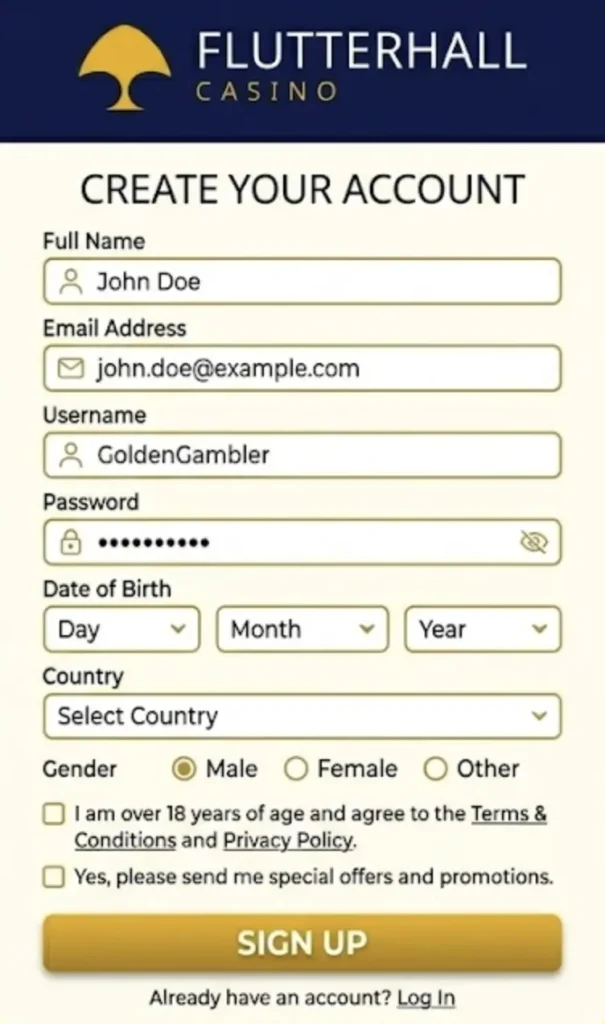
- Initiate the process: Click the “sign up” button in the upper-right corner of the site.
- Enter data: Share your email, telephone number and create a Flutterhall Casino login password.
- Choose country: Select the UK from the list and GBP as the currency.
- Approve: Double-check the data and approve.
Once done, you will be directed to the homepage of our platform. From there, you can deposit funds and get the first deposit bonus with the promo code LETSGO. This gets you a 100% match up to GBP 1,000 + 150 free spins and Puzzle Flip. Just complete the Flutterhall login next time you want to play.
Requirements for the Flutterhall Sign Up
To create a profile on the site, you must be at least 18 years of age and physically located in the United Kingdom. You also need a valid email address and British telephone number. Members can have only one profile on the site. Making multiple ones is against our terms of service.
The registration itself doesn’t require additional details. However, customers should add these to the information section. These include full name, address and similar details. This data will be used for KYC afterwards.
Know Your Customer Verification
All players are required to complete the KYC or Know Your Customer procedure before they can cash out. We advise you to verify the identity immediately after the first Flutterhall login. The process is covered in the following table.
| Step | Documents | Explanation |
|---|---|---|
| 1 | ID card, passport or driver’s license photo. | To verify your identity. |
| 2 | Lifeness check. | A selfie is required. |
| 3 | Bank statement or a utility bill image. | Used for address information. |
Additionally, you are required to verify the phone number via SMS message. In addition, we reserve the right to ask for additional documents after the registration. We accept JPG, PNG, png and PDF file formats, which must clearly show the required facts.
Flutterhall Casino Login Guide
Every time you want to play, you need to log in to your account on the platform. The process is simple and requires just a few steps, as shown below.
- Launch login: From the upper section of the website, click the “Flutterhall login”.
- Enter data: Share your email and password.
- Confirm: Approve to be directed to your profile.
Make sure to use a strong password. Change it regularly and use a mixture of letters, numbers and even symbols to make it more secure. Never share it with third parties. If you are the sole user of a device, feel free to save the credentials. However, if you are sharing a device, keep Flutterhall Casino login details private.
Android and iOS App Login
British players can easily access their page on the site via a smartphone or a tablet. First, load the website in Safari or Chrome (other browsers are supported as well), then add the shortcut to the homepage. This installs the PWA app on any Android and iOS device. Launch the software and tap the Flutterhall login button. Share the same credentials as you use on PC or website and confirm.
Using this method allows you to activate biometric protection on your phone. Using a fingerprint scanner or Face ID significantly limits who can access your casino profile.
Personal Details We Require for the Flutterhall Registration
Customers from the United Kingdom need to share their full name, address, payment details (for deposits and withdrawals) and telephone number. For the sign up procedure, you only need an email and a phone number.
Additional information is needed to complete your page on the website and to complete KYC verification. All the details you specify are kept encrypted on our servers and never shared with third parties.
Possible Log In Complications
Although rare, some Britons have experienced complications while trying to access the casino and Flutterhall login. You can always contact the support team and get assistance via live chat or email. But, most of the time, you can resolve the issue by following these tips.
| Issue | Cause | Fix |
|---|---|---|
| Wrong email | Mistake while entering the email address. | Try again and double-check the spacing. |
| Wrong password | You have forgotten or changed the password. | Reset it using the online form. |
| The Flutterhall Casino login is unavailable | Trying to access the website outside the UK. | Access the platform from an accepted country. |
| Unable to access the profile | Suspended account due to TOS violation. | Check our terms and get in touch with customer support. |
If the issue is not listed in the table, use the live chat for assistance to resolve the problem. Our support agents are available 24/7 in English. In addition, you can contact them if you have any complications with registration.
How to Complete Flutterhall Login and Delete Your Account
Members who want to stop playing at our casino can request the account removal service. Basically, this allows them to remove the profile from our database. First, you need to get in touch with our agents using the chat option on the site or email. Explain your request and answer a few basic questions. When done, the Flutterhall Casino login feature will be unavailable to you.
The process takes around 24 hours, but it usually takes a few hours. We will notify you when it’s done. If you want to start playing again, you must register again.
Users who are worried about their gambling habits can use self-exclusion. It limits access to the casino for a specified period. The Flutterhall sign up option is also unavailable.